[TuT] How to make a Machinima Map & Machinima
Posted: Fri Jul 31, 2009 9:50 am
This process although quite simple, I feel should be spoken out so even though people have the lovely machinima map pack, people can expand their machinima's to other maps for their series, shorts and so forth.
Writing a Script
First off my interested Director! You need to do the following. Make a script, although I cannot explain what this requires, but these are the scopes you need.
1. Make sure your story has a center plot, funny or not it needs an answer to "What is the purpose of this?"
2. Make sure it makes sense, re-read your script many times over to fix spelling mistakes and so forth.
3. DON'T copy other machinima writers. ex: Digital Ph334, Reverb, saber cow and so forth.
4. Detail. No matter what, the more detail, the more in-depth the story will be and the more interesting it will be to the watchers of your film. just don't over do it. Mkay?
Now then, I give you a handy dandy guide so you can make one yourself by doing the following, as well as make your Machinima watchable, enjoyable and complaint free. (P.S RandomDCE FTW)
How to make the map.
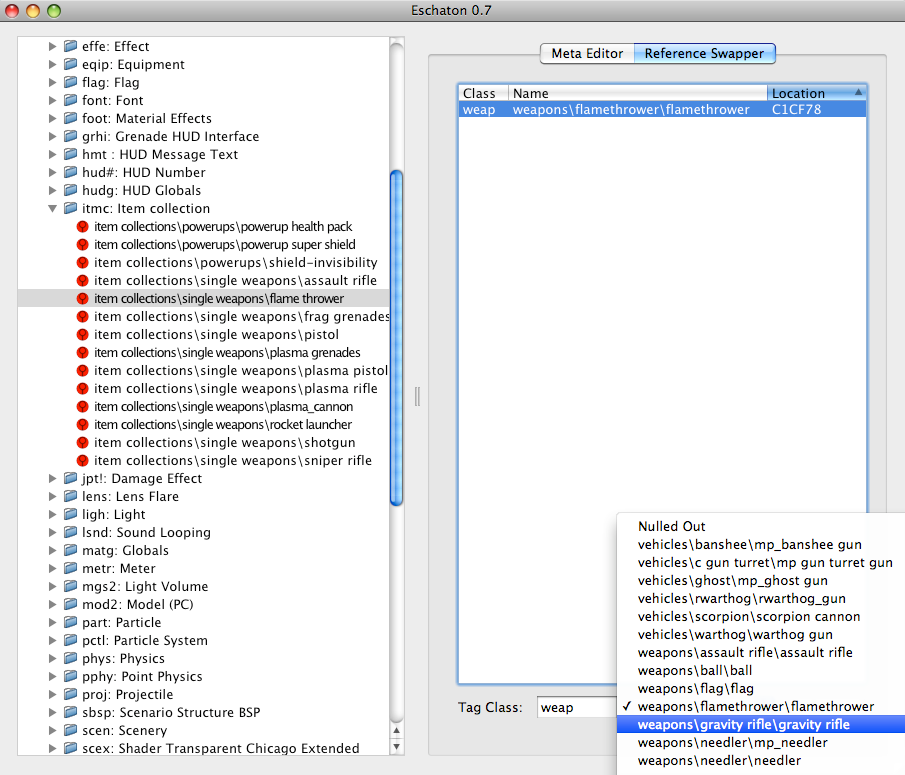
Step 1. Open BG in eschaton, locate the Gravity Rifle weap, and spawn in in place of any weapon you won't need, more then likely the flamethrower or such, or an equip item.
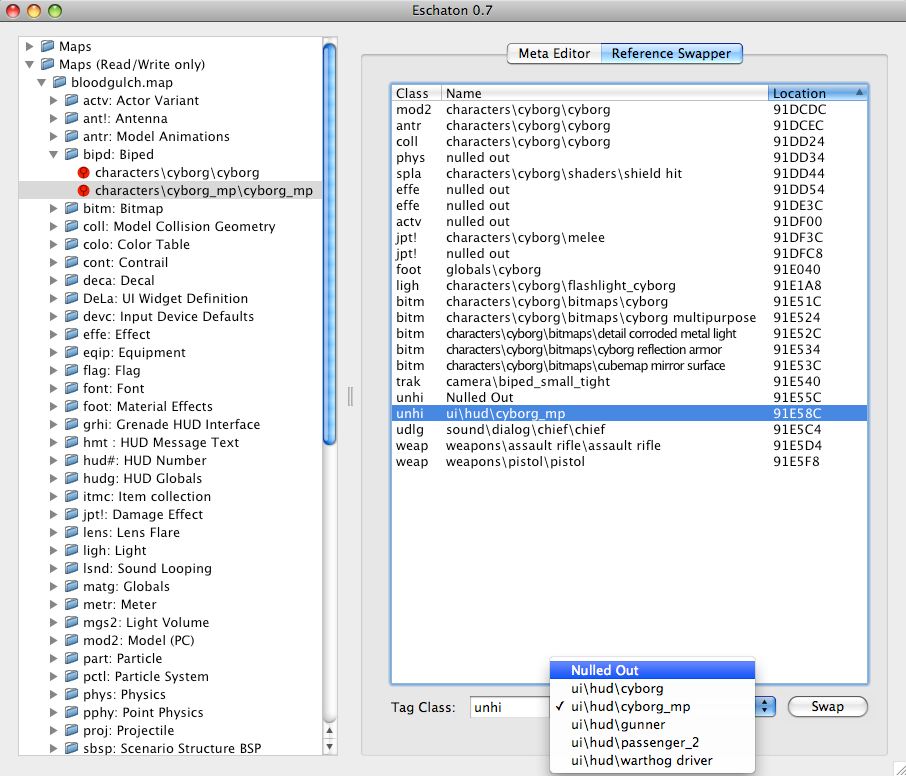
Step 2. From there, go into the Cyborg_Mp and look for unhi under the bipd tag. Null both the single player and mp. (Do this if you include a new bipd as well)
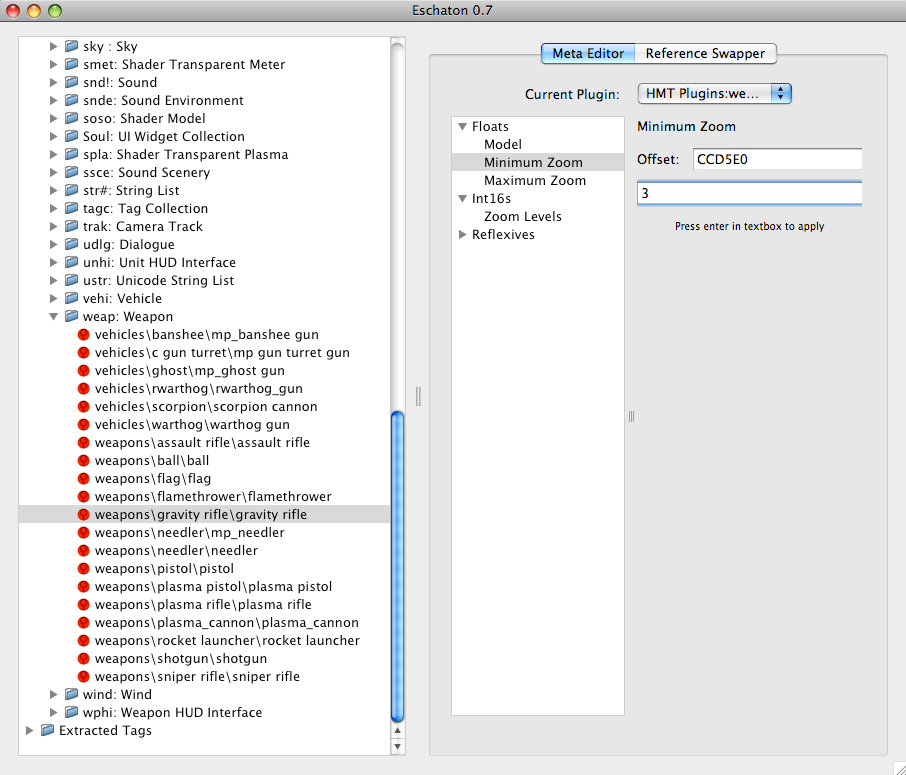
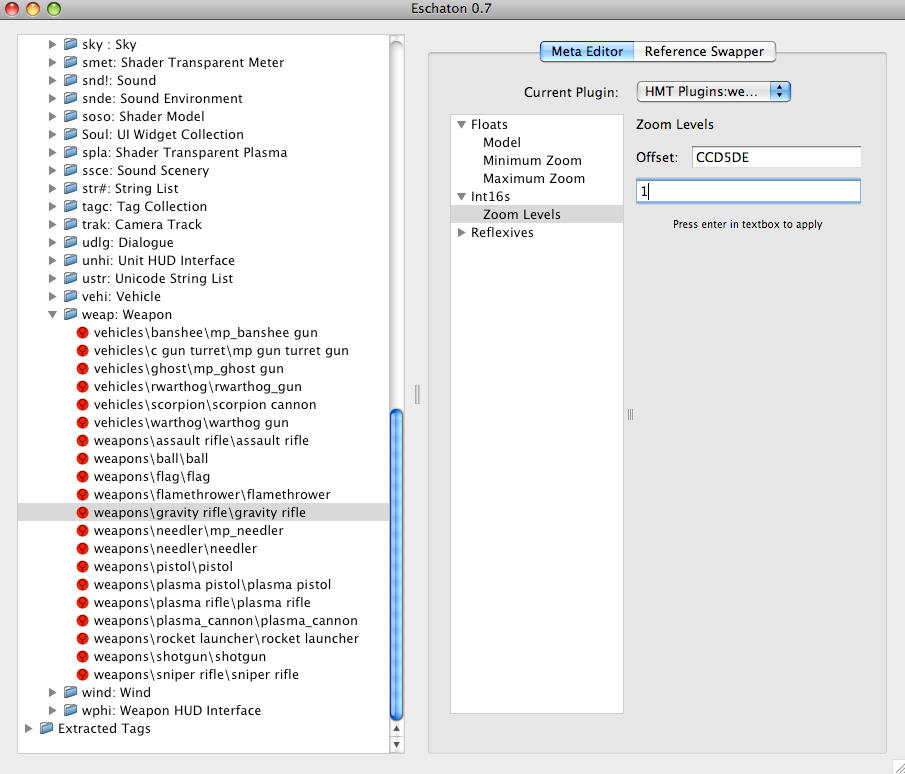
Step 3. Go to weap in Eschaton, select the Gravity Rifle, and switch the plug in to HMT, go into Floats and put the minimum and maximum zoom to 3, then go to int16s and under zoom levels put 1.Then go in-game and press whatever button you use for zoom for sniper, with your gravity rifle and congrats you got yourself a bloodgulch with a working camera!
Recording Your Machinima!
Step 1. Go find yourself 100 bucks and buy ScreenFlow. Before doing ANY Recording learn to use it, how it works and so forth.
Step 2. From there, get some of your friends, give them the map and record your machinima!
Step 3. Quality. Yes, VERY important. If it's a badass story, but horrible pixalated quality, most will not watch it. I use iMovie HD and if you want HD quality do the following.
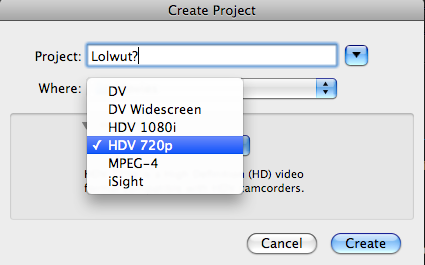
A. First, before you start making your movie, make a new project and Select HDV 720p, this works best with Youtube.
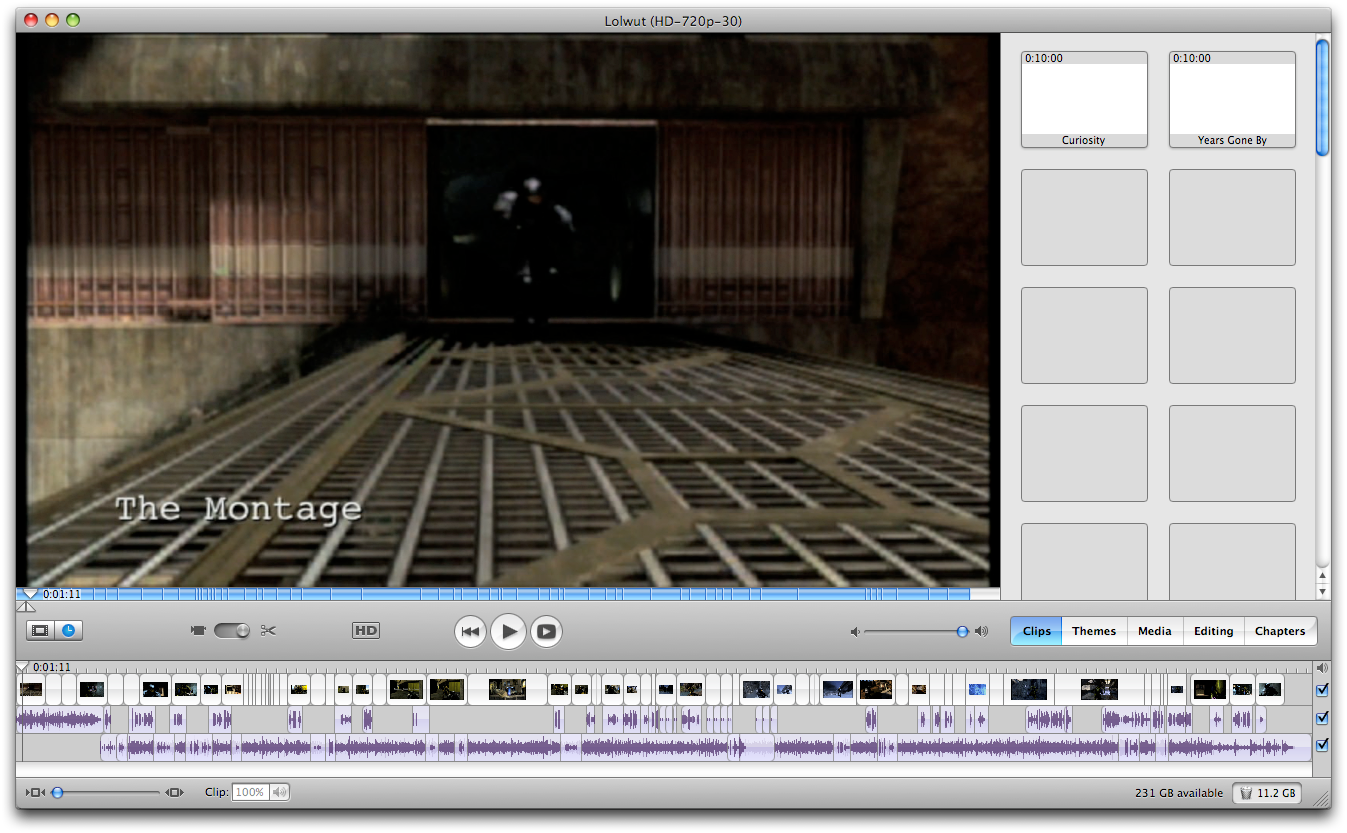
B. Create and edit your movie.
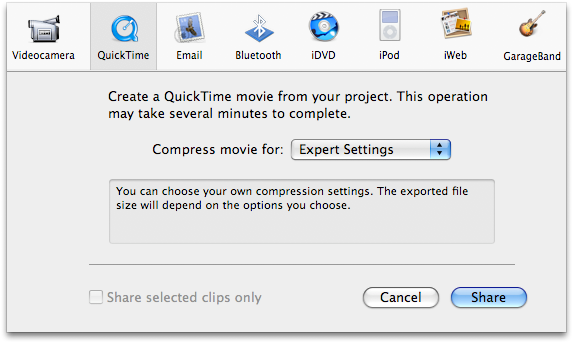
C. Go up to File->Export-> Expert settings and select movie to MPEG-4
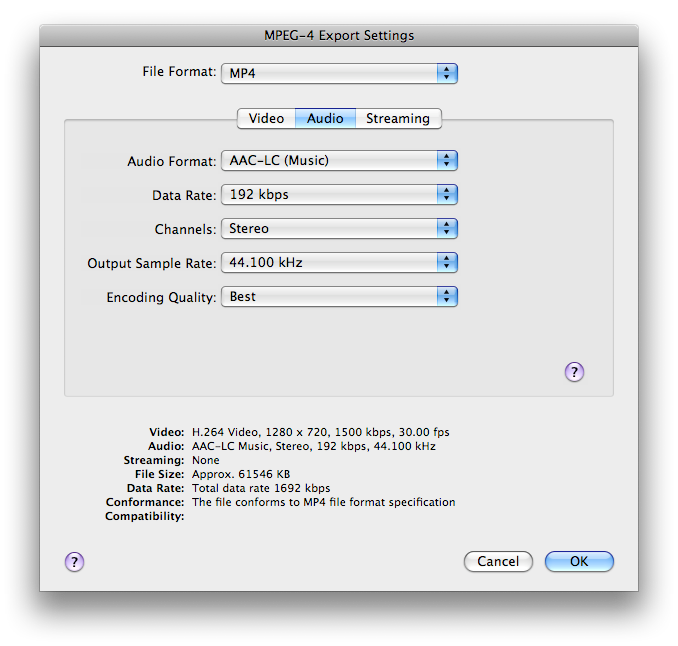
D. Click Options next to it and make your settings look like this...
Video
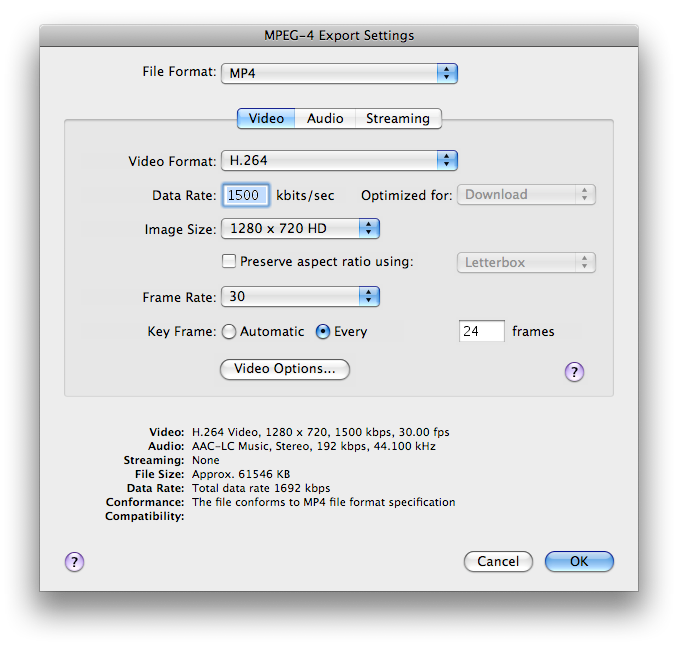
Then the sound...
E. Upload to YouTube and Enjoy!
Bit of History
in the beginning days Reverb used Snapz Pro X, however we switched to ScreenFlow, which has much better ability and easy to use. I highly recommend it.
Writing a Script
First off my interested Director! You need to do the following. Make a script, although I cannot explain what this requires, but these are the scopes you need.
1. Make sure your story has a center plot, funny or not it needs an answer to "What is the purpose of this?"
2. Make sure it makes sense, re-read your script many times over to fix spelling mistakes and so forth.
3. DON'T copy other machinima writers. ex: Digital Ph334, Reverb, saber cow and so forth.
4. Detail. No matter what, the more detail, the more in-depth the story will be and the more interesting it will be to the watchers of your film. just don't over do it. Mkay?
Now then, I give you a handy dandy guide so you can make one yourself by doing the following, as well as make your Machinima watchable, enjoyable and complaint free. (P.S RandomDCE FTW)
How to make the map.
Step 1. Open BG in eschaton, locate the Gravity Rifle weap, and spawn in in place of any weapon you won't need, more then likely the flamethrower or such, or an equip item.
Step 2. From there, go into the Cyborg_Mp and look for unhi under the bipd tag. Null both the single player and mp. (Do this if you include a new bipd as well)
Step 3. Go to weap in Eschaton, select the Gravity Rifle, and switch the plug in to HMT, go into Floats and put the minimum and maximum zoom to 3, then go to int16s and under zoom levels put 1.Then go in-game and press whatever button you use for zoom for sniper, with your gravity rifle and congrats you got yourself a bloodgulch with a working camera!
Recording Your Machinima!
Step 1. Go find yourself 100 bucks and buy ScreenFlow. Before doing ANY Recording learn to use it, how it works and so forth.
Step 2. From there, get some of your friends, give them the map and record your machinima!
Step 3. Quality. Yes, VERY important. If it's a badass story, but horrible pixalated quality, most will not watch it. I use iMovie HD and if you want HD quality do the following.
A. First, before you start making your movie, make a new project and Select HDV 720p, this works best with Youtube.
B. Create and edit your movie.
C. Go up to File->Export-> Expert settings and select movie to MPEG-4
D. Click Options next to it and make your settings look like this...
Video
Then the sound...
E. Upload to YouTube and Enjoy!
Bit of History
in the beginning days Reverb used Snapz Pro X, however we switched to ScreenFlow, which has much better ability and easy to use. I highly recommend it.
