----------------------------------------------------------------
Another newest option!
Check out Colloguy
It is like the Adium for IRC clients.
NEW OPTION
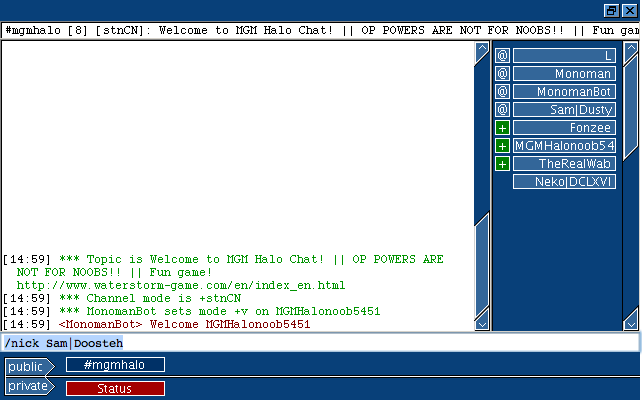
Monoman got us an easy online IRC client, which is just a website where we can chat. you can get there by
1A ) Clicking on my sig
1B ) Click here.
2) Then type /nick {YOURNAMEHERE}
----------------------------------------------------------------
IRC stands for Internet Relay Chat.
It is pretty much Instant Messaging, except that it is great for many people.
So, recently I made an MGM halo IRC channel.
And, heres how it works.
First of all, you will need an IRC client. There are many, but not so many for mac. So Here are some.
mIRC for mac
Ircle
Chatzilla
My favorite is chatzilla. There are also some web hosts but I couldn’t find any for the server I made. Chatzilla is an Add-On for SeaMonkey or FireFox. You can find the download here:
https://addons.mozilla.org/en-US/firefox/addon/16
Download that, and you can run it by going (from firefox) Tools>Chatzilla
If you chose to use Ircle, you can download here:
http://www.ircle.com/download.shtml
It is only a 30 day trial, though. Once you download that, open it.
I’m not sure how to open mIRC, but here is a website:
http://macirc.co.uk/
And you can download there.
Now, once you have IRC open, follow my instructions.
NOTE: will be taking pics from Chatzilla.

Key:
Yellow- Names list
Orange- Current server/channel
Red- Topic
Blue- Chat log
Green- tabs
Purple- Current Nickname
Pink- Textfield
1) Make your nick name, by typing in the TEXTFIELD /nick {YOURNICKNAME}
Example: /nick Dustyjjc, for me.
“Only alphanumerical characters are allowed in Q account names, your nick must not contain the following characters: "`~^[]{}|_". “
2) In the TEXTFIELD, type /server irc.quakenet.org
You should see a long list ‘o crap come up. Ignore that if you want
3) Type /msg Q HELLO {YOUREMAIL} {YOUREMAIL}
You need to type it twice to verify it. This will send you an email with your password for the quakenet server. You shouldn’t have to do this twice.
They will not send you spam.
Example:
/msg Q HELLO isuckfork@spam.net isuckfork@spam.net
4) Go to your email and confirm your password (by following emailed instructions), giving you an official registered quakenet account.
4a) They will give you a weird password, so if you really want to change it type:
/msg Q@CServe.quakenet.org NEWPASS {oldpassword} {newpassword} {newpassword}
Typing new pass twice, to verify it. It should say pass was changed.
Example:
/msg Q@CServe.quakenet.org NEWPASS aks1ds bobsaget bobsaget
5) Once your pass is registered, you should be able to join our channel. Type:
/join #MGMHalo
Then a new tag should open and you should be inside the channel.
Since its new, someone might not be there.
6) Right click (ctrl+click) on the #MGMHalo tab and select Open this Channel At Start up
That way, every time you launch Ircle/Chatzilla/MacIRC, you will join our channel emidiatly.
If you have any question/trouble shooting, talk to me or email or look at http://www.quakenet.org/
Remember, Ircle and MacIRC look a lot different than Chatzilla.
I strongly recommend chatzilla, because it is free, easy to use, and clean. The only downside to Chatzilla is that you must start chatzilla from firefox or SeaMonkey. But then, you can just close the browser and keep it open.
I will be making all MGM oldies voice status (able to kick people) or even ops being able to change lots of stuff.
Servers host channels. There are many channels with in 1 server.
Other functions:
/me --> Replaces with your name. Type: “/me eats fish” “Dustyjjc eats fish” (example)
/nick --> changes nick
/topic --> changes current topic
"Highlighting" is to type someones nickname, and it beeps them.
You can make private chats.
Please no excessive swearing in the channel. Yada yada yada, you know the rules. Just follow em.
~Sammy

Note: posted in both halo sections so everyone would find it.


